
A ROBUST WAREHOUSE MANAGEMENT SYSTEM FOR REAL-TIME OPERATIONS
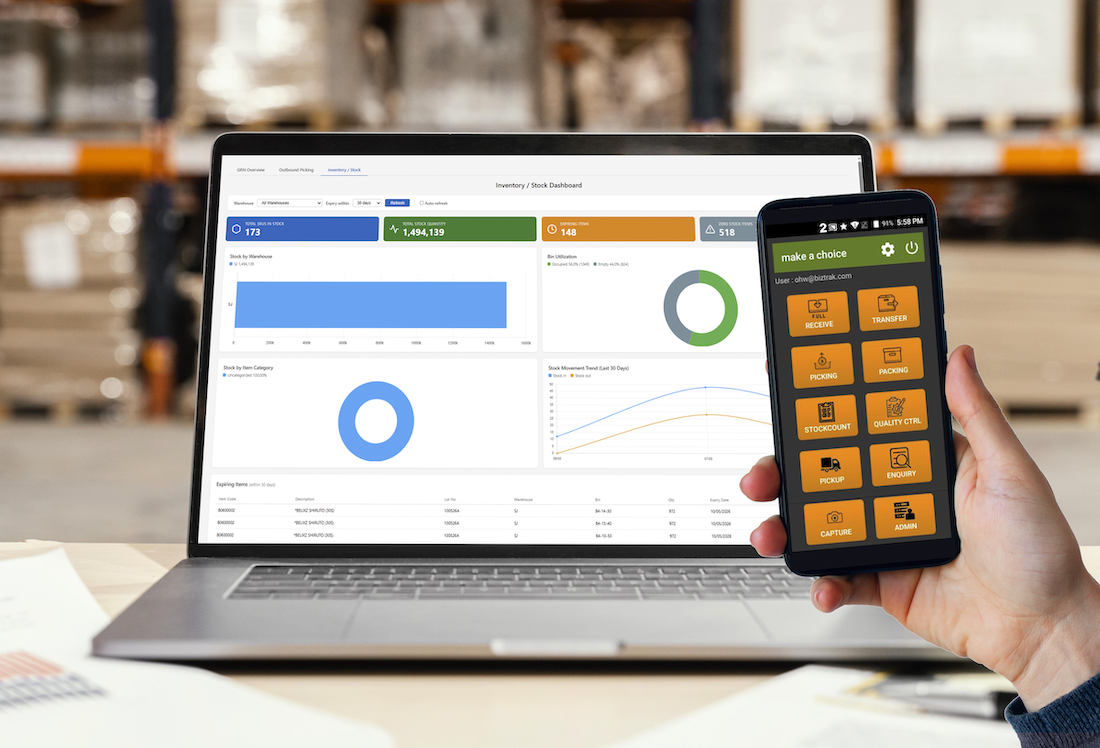
Biztrak WMS is a robust, real-time Warehouse Management System designed to support the demands of today’s fast-moving and highly dynamic warehouse environments. It is especially well suited for third-party logistics (3PL) providers that manage inventory and fulfilment for multiple customers with diverse operational requirements.
Combining powerful functionality with an intuitive user interface, Biztrak WMS helps businesses streamline warehouse operations, improve inventory accuracy, and gain full visibility over stock movements in real time.
Built for Performance and Ease of Use
In a busy warehouse, speed, responsiveness, and usability are critical. Biztrak WMS is developed with these priorities in mind, enabling your team to perform tasks efficiently while maintaining high levels of accuracy and control.
In addition to the software, we provide a full range of supporting services, including:
- Warehouse Process Consultancy
- Software Customisation
- Business Report Development
- User Training and Implementation Support
Real-Time Inventory Dashboard
Monitor your warehouse performance instantly with the latest Biztrak WMS Dashboard.
Designed to present key inventory information in a clear and visual format, the dashboard gives warehouse managers a comprehensive overview of stock status and operational trends at a glance.
Dashboard Highlights
- Total Active Stock Items – Number of SKUs currently managed
- Inventory Quantity on Hand – Real-time stock balances
- Expiring Items – Identify products nearing expiry
- Low Stock Alerts – Replenishment warnings based on minimum levels
- Interactive Charts & Graphs – Analyse stock distribution, movement trends, and item categories
- Expiry Listings – Detailed batch and expiry information
With this centralised dashboard, you can quickly identify issues, monitor performance, and make proactive decisions to optimise warehouse efficiency.
Mobile Warehouse Operations
Biztrak WMS includes a powerful Android mobile application that allows warehouse staff to perform daily operations directly from handheld devices.
Mobile App Functions
- Goods Receiving
- Stock Transfer
- Picking
- Packing
- Stock Count
- Quality Control
- Pickup and Delivery
- Photo Capture
- Inventory Enquiry
- Administration Functions
The mobile app enables real-time transaction processing on the warehouse floor, reducing paperwork and improving operational accuracy.
Complete Visibility from Office to Warehouse Floor
By combining a web-based dashboard with a fully integrated mobile application, Biztrak WMS provides end-to-end visibility and control over your warehouse operations.
Whether you manage a single warehouse or multiple distribution centres, Biztrak WMS helps you:
- Improve inventory accuracy
- Increase operational productivity
- Reduce manual errors
- Enhance customer service
- Scale with business growth
Future-Ready Automation & Robotics Capabilities
ASRS (Automatic Storage and Retrieval System) Integration
- Biztrak WMS can integrate with ASRS to automate storage and retrieval processes—maximising space utilisation while reducing manual handling.
Auto-Picking Enablement
- Support for automated picking technologies such as pick-to-light, conveyor systems, and goods-to-person workflows to significantly improve picking speed and accuracy.
Robotics Integration
- Compatible with warehouse robotics (AMRs/AGVs), allowing automated transport of goods across your warehouse—reducing labor dependency and increasing throughput.
Scalable Automation Framework
- Start manual, grow into automation—Biztrak WMS evolves with your operational maturity without requiring system replacement.
Why Biztrak WMS
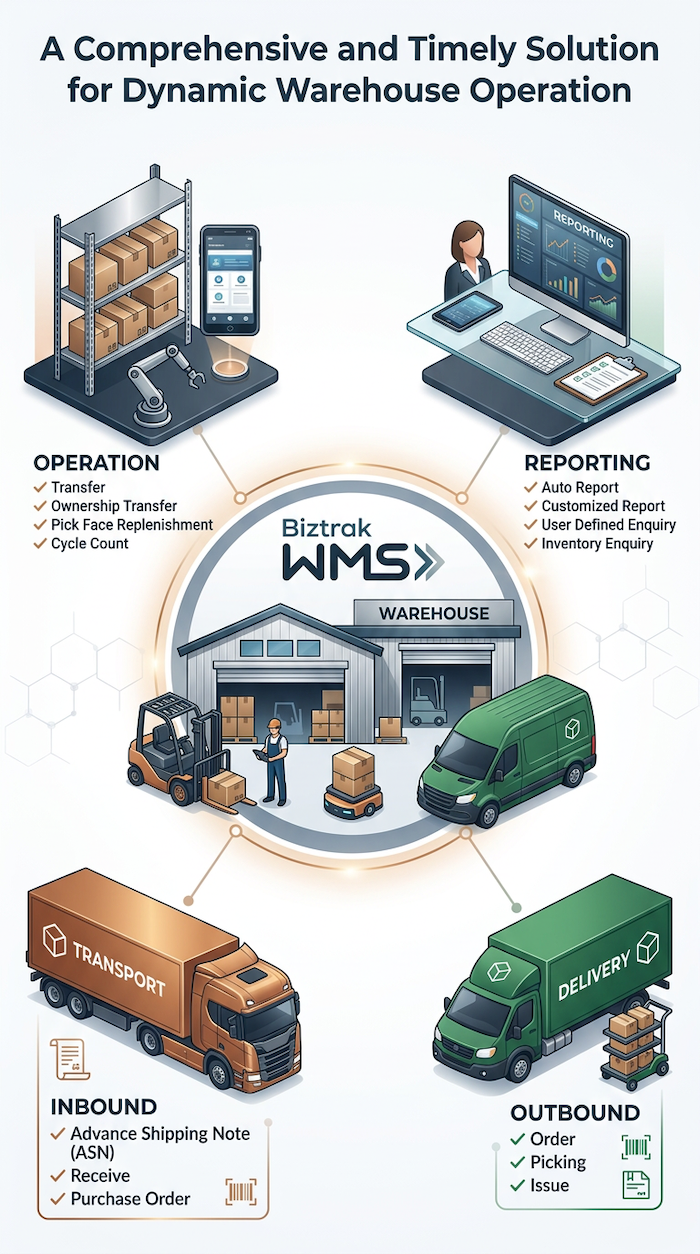
An integrated warehouse inventory management software which is designed to improve
the efficiency, accurancy and operating cost of warehouses.
Modules & Features
| Features | Descriptions |
|---|---|
| Purchase Order |
|
| Advance Shipping Notice |
|
| Receive |
|
| Features | Descriptions |
|---|---|
| Order |
|
| Picking |
|
| Combined Picking |
|
| Packing |
|
| Issue |
|
| Issue |
|
| Features | Descriptions |
|---|---|
| Transfer |
|
| Ownership Transfer |
|
| Pick Face Replenishment |
|
| Cycle Count |
|
| Bin Put-away Allocation |
|
| Features | Descriptions |
|---|---|
| Biztrak Auto Report |
|
| User Customizable Report |
|
| User Definable Enquiry |
|
| Features | Descriptions |
|---|---|
| Multi warehouse capability |
|
| Flexible Bin Structure |
|
| Multiple UOM and Variant |
|
| Inventory by multiple parties (Multi Customer) |
|
| Picking Algorithm |
|
| Customized business document by Party |
|
| Auto trigger Product Expiry |
|
| Features | Descriptions |
|---|---|
| User Defined Fields |
|
| Security & Access Traceability |
|
| Collaboration |
|
| Multilingual Support |
|
| Import External Data |
|
| Export Data |
|
| User Definable Transaction Type |
|
| State-of-the-art Data Grid |
|
| Duplicate Document |
|
| Bookmark |
|
| Features | Descriptions |
|---|---|
| Customer Web Portal |
|
| Features | Descriptions |
|---|---|
| Mobile Application |
|
- Order transaction
- DHL Courier Service Provider for the shipment booking and shipping label.
- Citylink Courier Service Provider for the shipment booking and shipping label.
- Daily Issue by Item Categories
- Daily Issue by Item Type
- Daily Receive by Item Type
- Daily Receive by Item Categories
- Physical Inventory by Item Categories
- Current Physical Inventory VS Usable Inventory
- Physical Inventory by Item Types
- Daily ASN Status
- Daily WEB ASN Status
- Daily Order Status
- Daily WEB Order Status
Kitting module is a crucial component in warehouse management systems (WMS). It is a feature that allows users to group and assemble individual items or components into a single kit or package. This module provides users with the ability to create a kit, track inventory of both kits and individual components, and manage the assembly of kits. It also enables users to specify the components and quantities needed for the kit.
The kitting module is an advantageous tool that offers greater efficiency and accuracy in managing inventory and assembly processes. It accomplishes this by grouping individual items into kits, making it easy for users to locate all the necessary components for a specific product or order. This feature saves time and effort that would otherwise be spent locating and gathering individual items, which is especially useful in high order volume or complex assembly environments. Additionally, the kitting module can help to reduce errors in assembly and inventory management by providing a clear, organised view of all the components needed for each kit or product.
| Features | Descriptions |
|---|---|
| Master Data Setting |
1. Item Profile Setting (Enhancement) 2. Item Component Setting (Enhancement) |
| Work Order Wizard |
1. Work Order Transaction – Work Order Wizard (New) The Work Order Wizard allows user to generate work order transaction with OPEN status by batch. The default number of batch will always be one if user does not specify any. There are two sections in this wizard requires user’s input. a. Warehouse Code [Linked from Warehouse Profile] b. Source Code [Linked from Source Profile] c. Document Date d. Party Code [Linked from Customer Profile e. Party Branch Code [Linked from Customer Branch] f. Reference No. a. Item code [Linked from Item Profile which has Item Component setting] b. UOM Code [Linked from Item Profile which has Item Component setting] c. Item Variant Code [Linked from Item Profile which has Item Component setting] d. Quantity: Order e. No. of Batch(s) (Default always be one) User can proceed by clicking [Generate] button to generate work order transaction directly or clicking the [Analyze] button to retrieve a summary report to analyze any item shortage. 2. Work Order Summary Report (New) A new report to show the summary of the total quantity needed for the item components and the total usable quantity from inventory balance. User can then request the approval from management for the replenishment due to item shortage. a. Warehouse Code [Linked from Warehouse Profile] b. Source Code [Linked from Source Profile] c. Document Date d. Document Date e. Party Code [Linked from Customer Profile] f. Party Branch Code [Linked from Customer Branch] g. Reference No. h. Status |
| Work Order Module |
1. Work Order Transaction – Work Order Module The Work Order allows user to create a transaction for managing the kitting operation which includes finished goods and item components. This module separated to one header and three details which are finished goods, item components and apply of the item components. a. Line Number (Indicates batch] b. Status c. Process d. Item Code [Linked from Item Profile which has Item Component setting] e. UOM Code [Linked from Item Profile which has Item Component setting] f. Item Variant Code [Linked from Item Profile which has Item Component setting] f. Quantity a. Line Number (Indicates batch] b. Status c. Process d. Item Code [Linked from Item Profile which has Item Component setting] e. UOM Code [Linked from Item Profile which has Item Component setting] f. Item Variant Code [Linked from Item Profile which has Item Component setting] g. Quantity h. Quantity Applied i. Quantity Issued j. Quantity Received k. Item Type Code [Linked from Item Type] l. Pallet Type Code [Linked from Pallet Type] m. Production Date: From n. Production Date: To o. Expiry Date: From p. Expiry Date: To q. Lot No. r.Serial No. a. Document No. b. Document Date c. Pallet No. d. Bin Code e. Quantity f. Pallet Type Code g. Item Type Code h. Production Date i. Expiry Date j. Lot No. k. Serial No. User can click on the function [Auto Allocation] to allocate the usable quantity from inventory balance to the item components’ order quantity according to the input criteria respectively. System will automatically reduce the quantity applied to the maximum quantity that can build finished goods if one of the item components has shortage. 2. Generate Issue (Item Components) – Work Order Module (New) User can proceed to generate issue from header after done the allocation and posted the work order. If there is discrepancy between Order Quantity and Allocated Quantity, system will prompt a confirmation dialogue for user to decide whether append the shortage of the item component into new line or just ignore it. |
| Issue Module |
1.Generate Receive (Finished Foods) – Issue Module (New) When system detects the selected issue is generated from work order module, user can click on the [Generate Receive] function to create Receive transaction with the relevant finished goods according to the item components quantity(s) that has been issued. |
Request a Demo
Discover how Biztrak WMS can transform your warehouse operations with real-time visibility, automation, and mobile efficiency. Contact us today to schedule a personalised demonstration.